How to Apply Oasis Scholarship Online | Register | Guide
If you’re a SC, ST, or OBC student in West Bengal, the Oasis Scholarship can literally decide whether you continue your studies smoothly or keep worrying about fees every year.
The good news?
You can apply fully online, you just need to follow the steps carefully so your form doesn’t get rejected or stuck in “under verification” forever.
This guide will walk you through:
- How to register on the Oasis portal
- How to fill the scholarship form step by step
- How to upload documents correctly
- What’s new in 2025–26 (like biometric KYC & ST OTR)
- How to renew your scholarship
- How to track status and avoid rejection
All focused on West Bengal students, as the Oasis portal is a state portal for SC/ST/OBC scholarships in WB.
Before You Apply Oasis Scholarship | What You Need Ready
- Caste certificate (SC/ST/OBC)
- Income certificate (if required)
- Aadhaar card (or valid ID)
- Bank account in your name (for DBT)
- Mark-sheet of last passed class
- Passport-size photograph + signature (scanned)
- Pdf/JPEG scanner (mobile phone or scanner)
- Working internet + browser
Have everything scanned and saved on your device; it will speed up the process and reduce upload errors.
What’s New / Important for 2025–26?
Before we dive into steps, there are three important updates you should know:
Online application for 2025–26 is active
The Oasis home page clearly shows that online applications are open for Pre-Matric & Post-Matric SC/ST/OBC & Pre-Matric Component-2 for 2025–26.
Biometric KYC is now mandatory for some students
As per the portal, Biometric KYC is compulsory for Pre-Matric SC and Post-Matric SC students (starting 2024–25 session) and many colleges are asking students to visit Bangla Sahayata Kendras (BSKs) for biometric registration before processing applications.
ST students need OTR (One-Time Registration) on NSP
The Ministry of Tribal Affairs has made NSP OTR mandatory for ST students applying for Pre-Matric and Post-Matric scholarships. ST students must first generate OTR on the National Scholarship Portal, then apply through oasis.gov.in.
So in short:
SC students → watch out for Biometric KYC
ST students → do NSP OTR first
Everyone → apply on oasis.gov.in for 2025–26
How to Apply Oasis Scholarship Online (Fresh Application)
Let’s go through the entire process from zero to final submission.
Step 1: Check Your Eligibility First
Before opening the site, confirm that you:
- Belong to SC, ST or OBC (with valid caste certificate)
- Study in either:
– Class 9 or 10 (for Pre-Matric SC/ST), or
– Class 11, 12, UG, PG, Diploma, etc. (for Post-Matric SC/ST/OBC) - Have family income within the ceiling (check official notice / your institution’s scholarship cell)
- Are NOT in excluded categories:
- – Kendriya Vidyalaya
- – Jawahar Navodaya Vidyalaya
- – Certain fully residential central/state institutions (for some schemes)
If you pass this checklist, you’re ready.
Step 2: Collect & Scan All Required Documents
Keep soft copies ready (PDF / JPG as required):
- Caste certificate (SC/ST/OBC)
- Income certificate (current financial year)
- Aadhaar card
- Last exam marksheet (e.g., Class 8 for Pre-Matric, Class 10/12 for Post-Matric)
- Bank passbook (student’s own account, DBT-enabled; Aadhaar seeding strongly advised)
- Passport-size photograph
- Signature (if asked)
- Hostel certificate (if applying as hosteller)
- For “Uncleaned Occupation” scheme – proof of parent’s occupation, as applicable
Make sure scans are clear, straight, and readable. Blurry or cropped documents are a top reason for rejection.
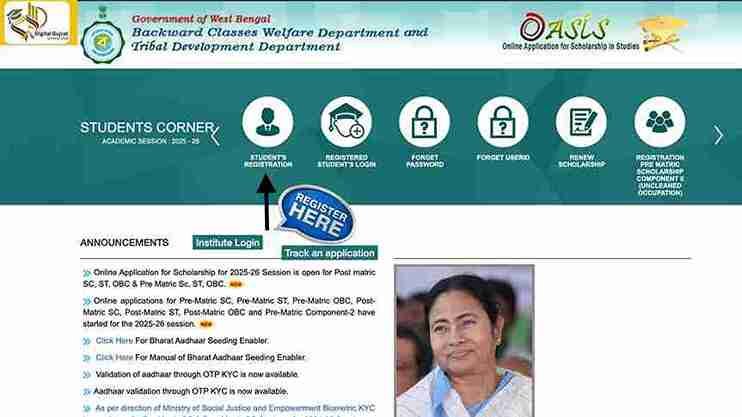
Step 3: Visit the Official Oasis Scholarship Portal
- Open your browser and go to: https://oasis.gov.in
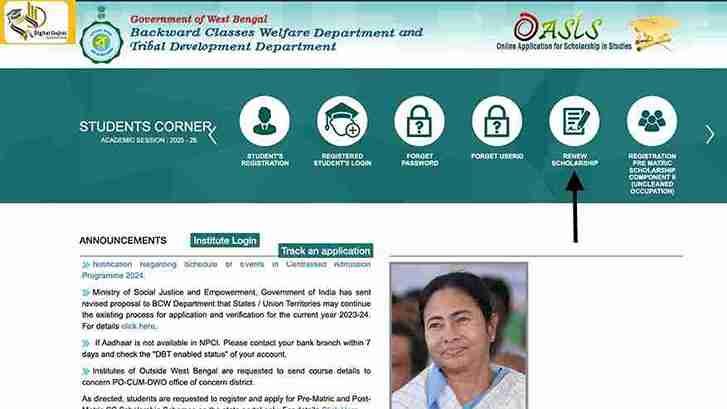
- On the homepage, look at “Students Corner – Academic Session 2025–26”. You’ll see options like:
- Student’s registration
- Registered Student’s Login
- Renew Scholarship etc.
- For a fresh application, click “Student’s Registration”.
Contact Your Institution
If your name in Banglar Siksha Portal is not matching with the name in Aadhaar
Step 4: Student Registration – Choose District & Verify Caste
You’ll be taken to the registration page:
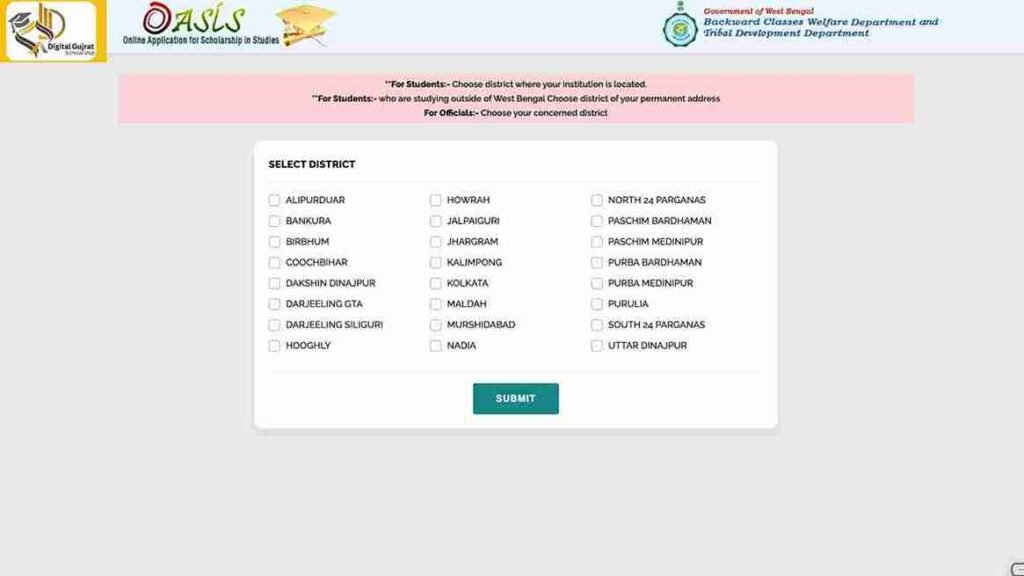
- Select your district
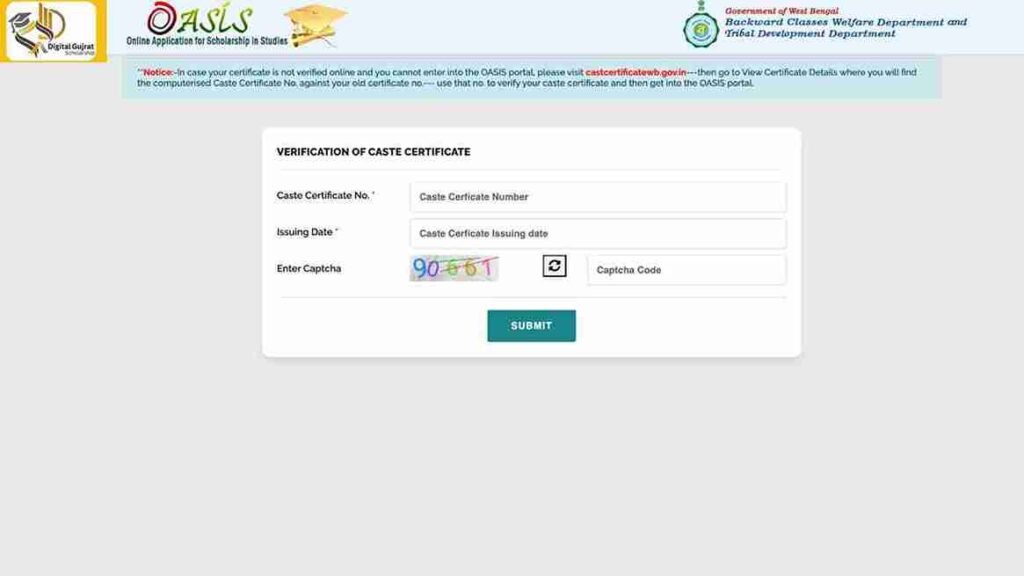
- Click “Submit / Proceed” – this opens a form asking for caste details.
- Enter caste certificate details
- Caste Certificate Number
- Issuing Authority / Date
- Category (SC / ST / OBC)
- Captcha code
- Click “Submit” or “I Agree” (depending on page layout).
If your caste-certificate is valid, the portal allows you to proceed. Otherwise, you may get an error, ensure correct details.
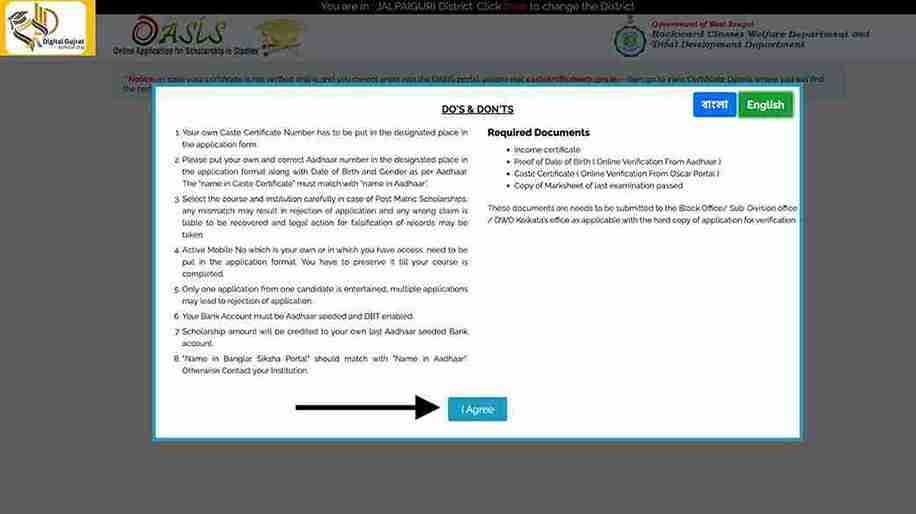
If your caste certificate is valid and matches the government database, you’ll proceed to the main registration form.
Note for OBC students:
The Oasis homepage currently shows a notice that OBC students with caste certificates issued before 01-08-2025 must re-validate their caste certificates before applying. There is an official revalidation portal link mentioned.
Step 5: Create Your Oasis Account (Registration Form)
You will be directed to a registration form. Fill in the required fields:
- Personal details – name, gender, DOB, mobile number, email
- Address details – permanent + present address
- Category details – SC/ST/OBC (auto-fetched from certificate in some cases)
- School/College details – institution name, type, district, current class/course
After completing:
- Click “Submit”
- You will receive your Application ID / User ID
- Set a password (keep it safe – you will need it for login, renewal, and status checks)
Step 6: Login to Oasis & Start Scholarship Application
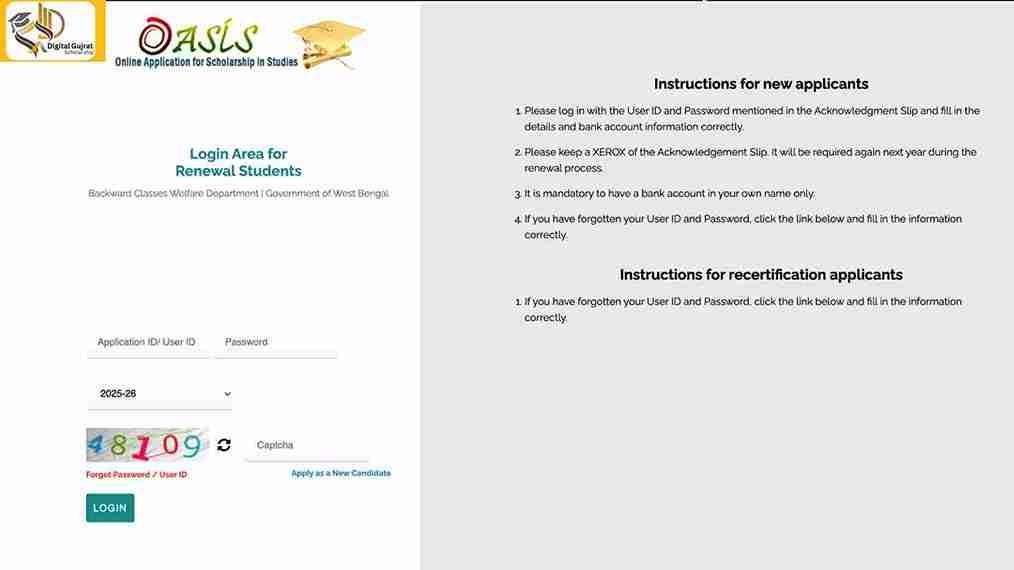
- Go back to the portal login area
- Click “Registered Student’s Login”
- Select your district again
- Enter:
- User ID / Application ID
- Password
- Captcha
- Click “Login”
From student dashboard, click: “Apply for Scholarship” (or similar scheme-wise button, e.g. Pre-Matric SC, Post-Matric OBC etc.).
Step 7: Fill the Scholarship Application Form – Section by Section
You’ll see a long form with several sections. Fill carefully:
- 7.1 Personal Details
Check that your name, caste, DOB, address are correct.
If anything is wrong (e.g. spelling mismatch with Aadhaar), correct it now or contact your institute / district welfare office. - 7.2 Academic Details
Fill in:- Present class (e.g. Class 9, 10, 11, B.A. 1st year etc.)
- Course name and stream (Science/Arts/Commerce, Diploma, Technical etc.)
- School/college name
- Board/University
- Roll number / registration number
- Year and marks of last exam passed
- For renewal cases, check that previous year data is correct and updated with new marks.
- 7.3 Institution Details
- Verify the institution code (if auto-filled)
- Confirm the district and address of your institute
- For outside-state institutes, there are special instructions; always confirm with your scholarship cell.
- 7.4 Bank Details (Very Critical)
- Enter details exactly as per your bank passbook:
- Bank name
- Branch name
- IFSC code
- Account number
- Account holder name (should be student’s own name)
Check that your account is DBT-enabled; Oasis notes that if Aadhaar is not available in NPCI mapping, you must contact your bank and ensure DBT-enabled status.
Be Careful
One digit wrong in IFSC or account number can delay your money by months
Step 6: Upload Required Documents / Scans
Upload all relevant documents in required format (usually JPEG or PDF). This may include:
Common uploads include:
- Photograph (passport size) + Signature
- Caste certificate
- Income certificate (current year)
- Last exam marksheet
- Aadhaar card/ID Copy
- Bank passbook (front page)/ cancelled cheque (for bank details)
Where applicable:
- Hostel certificate (for hosteller status)
- Disability certificate (for PwD)
- Parent’s occupation certificate (for “uncleaned occupation” scheme)
Document upload tips:
- Ensure file size is within the given limit (usually a few hundred KB)
- Use clear scans, not sideways, no shadows
- Name files in a simple way: caste_certificate.jpg, marksheet.pdf, etc.
- Double-check that each scan is clear, edges are visible, and data (name, certificate number, dates) are readable before final submission
Step 9: Save, Review & Lock Application / Submit Online Form
After filling all fields and uploading documents:
- Click “Save Draft” (if available) to avoid losing data
- Scroll through every section again
- Make sure no mandatory field is left blank
- Confirm spellings, numbers, and selected scheme
- Once sure, click “Submit” or “Lock Application”
Some guides call this “Lock & Forward” once locked, you usually cannot edit without official help, so review carefully.
Step 10: Download & Print Acknowledgement / Application Form
- Click “Reprint Acknowledgement” from the portal (there’s a link in Students Corner & District/Block corner too).
- Download and print the application form / acknowledgement slip
- Visit your school/college’s administration office
- Submit the printout + self-attested documents
- Ask for school verification, their official seal and signature
This printed copy is not just for your records, in most cases you must submit it physically.
Step 11: Submit Printed Form to Your Institute / BDO / Municipality
- As per many official & institutional notices:
- You must submit the printed Oasis form plus attested copies of documents to:
- Your school/college (for initial verification), and/or
- Your BDO / Municipality / DWO office (depending on category & district practice)
- You must submit the printed Oasis form plus attested copies of documents to:
- Your institution does:
- Data cross-check
- Document verification
- Online verification / forwarding to district level
For many schemes (especially Post-Matric, Hostel, Unclean Occupation), you need to submit a hard copy of this print along with self-attested documents at your institution (school/college) for final verification
Once the institution verifies, the application moves to district-level verification and then fund disbursement.
Without this verification, the application may be rejected or remain pending.
Step 12: Complete Biometric KYC (For SC Students Where Required)
Without this verification, the application may be rejected or remain pending.
For Pre-Matric SC and Post-Matric SC students, the Ministry of Social Justice & Empowerment has made Biometric KYC mandatory from 2024–25, and colleges are issuing notices instructing students to go to Bangla Sahayata Kendras (BSKs) to complete biometric registration.
Typical flow:
- Visit your assigned BSK with Aadhaar and other documents
- Complete biometric (fingerprint / iris) KYC linked to your scholarship account
- Submit the proof/back-print if your college asks for it
If you skip biometric KYC where required, your Oasis application cannot be processed, as explicitly mentioned in recent college notices.
How to Renew Oasis Scholarship Online (For 2nd / 3rd / 4th Year)
If you already received Oasis Scholarship in a previous year, don’t create a new account.
Step-by-Step Renewal
- Go to oasis.gov.in
- Click “Renew Scholarship” or “Registered Student’s Login” under Students Corner
- Choose your district
- Login with old User ID + Password
- Select the new academic year (2025–26)
- Check and update:
- Personal details (if any change)
- Academic details (move from last year to current class)
- Bank details (ensure the same working DBT account)
- Upload updated income certificate & latest marksheet
- Click “Renew & Lock Application”
- Download and print the renewed application
- Submit to your school/college / BDO / Municipality with updated documents
- If you don’t renew every year, your scholarship stops.
Common Reasons for Rejection | And How to Avoid Them
Here’s what typically goes wrong:
- Name mismatch between Aadhaar, bank account, caste certificate, and application
- Old or invalid caste certificate
- For OBC in particular, revalidate older certificates if the portal/notice asks for it.
- Wrong bank details / non-DBT account
- Confirm IFSC and account number
- Joint v/s single account issues
- Ask bank whether account is DBT-enabled & Aadhaar-linked.
- Not submitting printed form & docs to institute/BDO
- Online submission alone is not enough; physical verification is crucial.
- Skipping biometric KYC (SC) or NSP OTR (ST)
- These are mandatory for many categories starting recent sessions.
- Income certificate older than allowed year
- Use current year income certificate as per guidelines.
- Blurred / partial document uploads
- Attach correct documents, if you apply for hostel grant or unclean occupation grant, make sure relevant certificates are ready.
Explore Digital Gujarat Scholarship, MYSY Scholarships and more in our blog section.
Summary: Why Following Each Step Matters
By following this detailed step-by-step process carefully, you maximize your chances of success. From accurate registration and document upload to correct bank details and hard copy verification, every step counts.
Use this guide as your checklist, and you’ll avoid common mistakes, speed up approval, and get your academic support on time.